Published on November 25, 2025

Written by: Brandi Wharton

Running Google Ads can feel like juggling kittens—especially if you’re a small business owner, an in-house marketer, or running an online store. Between confusing reports, campaigns that don’t deliver results, and ads that just don’t convert, it’s easy to feel like you’re throwing money away.
The good news? You can take back control and see a real return on your investment. Whether it’s a simple audit of your current campaigns or full ad account management, Found can help you get there.
- Clarify your goals
- Understand your audience
- Track what matters
- Organise your account
- Build trust with your customers
- Keep an eye on your competitors
- Write ads and landing pages that convert
- Use Google Ads features to your advantage
- Track performance and make adjustments
- Found can help
Here’s a step-by-step guide to take back control of your Google Ads.

Clarify your goals
Before touching your campaigns, ask yourself:
- Are you aiming to drive online sales or bring customers into your store?
- Do you want more enquiries or brand awareness?
- Are you trying to increase website traffic or increase form submissions?
For example, a Mount Maunganui café may want to use Google Ads to get more bookings for weekend brunch, while a Tauranga outdoor gear store might focus on online sales of hiking boots. Knowing your goal ensures every ad, keyword, and campaign is set up with a clear purpose.
Once you have your goals, set simple key results to track progress. You don’t need to get lost in technical jargon. Consider starting with metrics like how many enquiries or sales each campaign generates.
Understand your audience
Who exactly are you trying to reach? Think about:
- Demographics: Age, location, lifestyle
- Interests and habits: What websites do they visit? What problems are they trying to solve?
- Buying behaviour: Are they price-sensitive or looking for premium options?
For example, a Welcome Bay landscaping business might target homeowners aged 30–55 interested in garden design, while a Mount Maunganui surf shop might aim for young adults interested in outdoor sports.
Use tools like Google Analytics and Search Console to gather insights on your website visitors and past campaigns. These tools help you understand what’s working and where to focus your budget.
Track what matters
If you can’t measure it, you can’t improve it. Install conversion tracking on your website to see what happens after someone clicks your ad. For example, whether they make a purchase, book a service, or sign up for your newsletter.
For example, if your ads are driving clicks but not bookings, conversion tracking will highlight this issue. You can then tweak your ad copy, targeting, or landing page to turn those clicks into real results.
Organise your account
A messy Google Ads account wastes time and money. An organised account makes it easier to manage bids, budgets, and ad copy. Here’s how to tidy it up:
- Campaigns: Group by product, service, or goal. For instance, an online clothing retailer could have separate campaigns for men’s apparel, women’s apparel, and seasonal sales.
- Ad groups: Focus on specific themes. Each campaign might have 2–3 ad groups, each highlighting a product category or offer. The clothing retailer may have ad groups under the women’s apparel campaign for swimwear, summer shorts, or casual tops.
- Ads: Test 2–3 ads per ad group to see what resonates with your audience.
A clear structure makes optimisation faster and ensures you’re not overspending on ads that aren’t performing.

Build trust with your customers
Trust signals—both within your ads and on landing pages—improve click-through rates and conversions. Consider the following examples:
- Display customer reviews and testimonials on your landing page.
- Highlight awards, certifications, or local memberships (e.g., Roofing Association N.Z.).
- Offer guarantees or easy returns both on your website and in ad copy.
When your ads and landing pages feel credible, people are more likely to take action and become customers.
Keep an eye on your competitors
Reviewing what other businesses in your area are doing can help your ads stand out. Search for your key terms in Google and see who’s advertising. Take note of:
- The offers they’re promoting
- Their ad copy and calls to action
- Landing pages and user experience
Use this information to make your campaigns more targeted and compelling. But, avoid directly copying their content. Originality builds credibility.
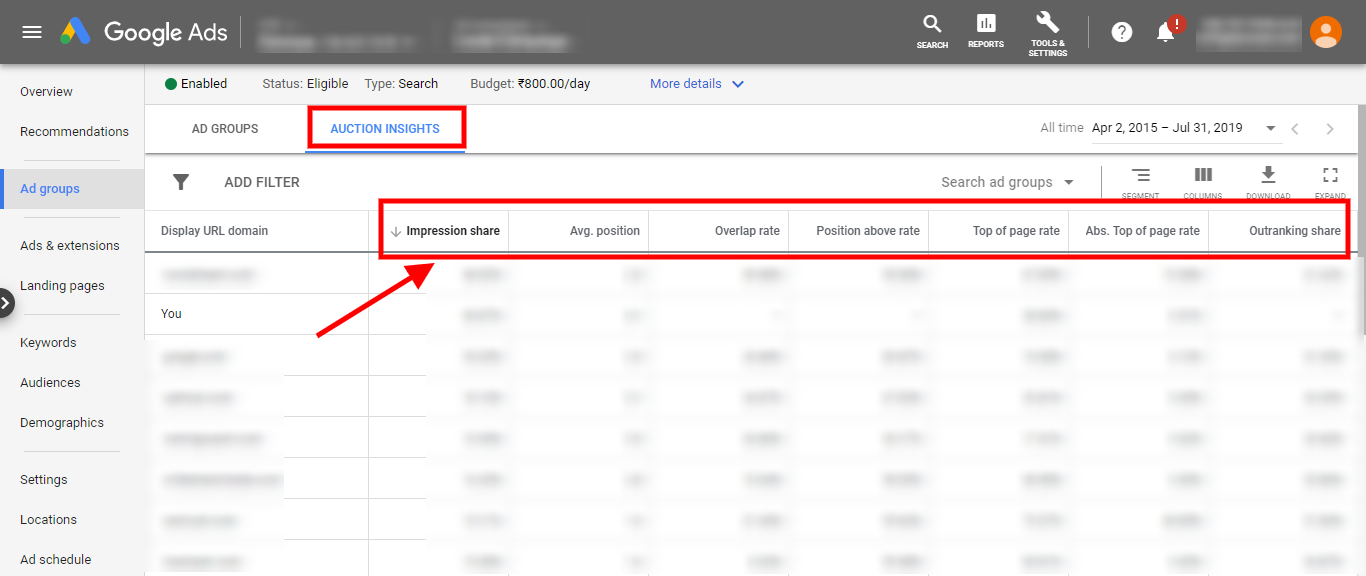
Tip: Use the ‘Auction Insights’ information in Google Ads to find out who your direct competitors are in your auctions, then view their ads in Google Ads Transparency Center.

Write ads and landing pages that convert
Ad copy is your first impression. If it doesn’t compel the person searching, they won’t click on it. Keep it:
- Clear: State exactly what your business offers.
- Relevant: Match the ad to the search term.
- Actionable: Include a strong call to action like ‘Book Now’, ‘Enquire Today’, or ‘Shop Online’.
Your landing page should continue the conversation and make the customer’s next step easy. If you’re advertising hiking boots online, the landing page should showcase the boots, pricing, and an easy purchase option, not a generic homepage.
Use Google Ads features to your advantage
Google Ads offers tools to help you show your ads to the right audience and improve performance.
- Ad assets: Add links to additional pages on your website, your business location, or callout text.
- Negative keywords: Prevent your ads from showing for irrelevant searches. For example, your ad shouldn’t show for someone searching ‘cat collars’ when you’re selling dog leashes.
- Smart bidding: Google can automatically adjust bids to get the best results within your budget. Monitor performance and tweak as needed.
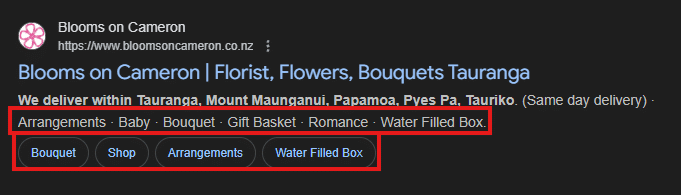
A Tauranga florist uses callouts for types of services and sitelinks to specific webpages to attract customers searching for 'flower delivery near me’. The ad text clearly states their delivery area.

Track performance and make adjustments
Don’t just ‘set and forget’ your Google Ads campaigns. Regularly monitor their performance and:
- Identify which ads in your campaigns are performing well.
- Adjust underperforming ads.
- Experient with new ad copy, targeting or formats.
Even small changes can significantly improve your ROI. Tools like Google Analytics and Google Ads reporting make it easier to see the whole customer journey—from first click to final purchase.
Found can help
Not every business has the time or expertise to manage Google Ads effectively. At Found, we can help you:
- Audit existing campaigns: Spot gaps, wasted ad spend, and missed opportunities.
- Manage ad accounts: From keyword research to ad creation and campaign monitoring.
- Ongoing support: Regular reporting, insights, and campaign improvements.
Whether you want a one-off audit or full campaign management, Found can simplify Google Ads and help you get real results.
Take back control of your Google Ads and start seeing results today. Contact Found today to get started.
Related posts
Learn more about a range of digital marketing topics by diving into our other articles.
When Someone Searches for a Plumber in Tauranga, Who Actually Shows Up Online?
How well are Tauranga plumbing businesses showing up in local search results? We reviewed 10 sites and Google Business Profiles to see what opportunities are being missed.Read more

How Visible Are Tauranga Dental Clinics Online? A Local SEO Review
We analysed 10 dental clinics across Tauranga to see how effectively they’re appearing online. What we found highlights some clear strengths, and some surprisingly common gaps.Read more

How Tauranga Cafes are Showing Up Online (And Where Local SEO for Cafes Is Falling Short)
We analysed 10 cafes across Tauranga to see how well they’re showing up online. The results may surprise you—some of them certainly surprised us.Read more

Frustrated to Found: Unlock Website Growth with an SEO Audit
Frustrated by low traffic or slow results? An SEO audit uncovers what’s slowing you down and how to improve performance.Read more

Free SEO audits are free for a reason – here is why you should avoid them
Take a minute and save yourself the confusion that free audits bring.Read more

5 Signs Your Website is Costing You Business (and How to Fix It)
Your website is often your first impression. If it’s slow, confusing, or outdated, it could be costing you business. Here are five signs you need a refresh.Read more

Online Reviews Help Tauranga Businesses Stand Out in Local Search
Reviews boost trust, improve local rankings, and help local businesses get discovered. Learn how to use reviews to strengthen your visibility and attract more customers.Read more

Technical SEO Audits: Uncover Hidden Issues Holding Your Website Back
Find out how a technical SEO audit can reveal hidden issues that stop your website from ranking well. Plus, what you can do to fix them.Read more
Want to be found? Send us an enquiry
Get expert insight into what’s working, what’s not, and the next steps to strengthen your digital strategy.